Book every IEP meeting in minutes

SpedSync coordinates availability across your whole team and lets parents pick a time themselves — so the back-and-forth that used to eat your week now takes a single link.

SpedSync IEP meeting scheduling dashboard preview

Trusted by special education teams across growing districts.

Time saved

Hours saved per meeting, not minutes

Less back-and-forth

Fewer back-and-forth emails per IEP

Fast booking

Parents book in under 2 minutes

Time saved

Schedule IEP meetings 4× faster

Four-step SpedSync workflow for scheduling IEP meetings

Set up the meeting

Send parents a booking link

Parent books a time

Everyone stays in sync

Add everyone who needs to attend

Add the student’s IEP team members. Once they connect their calendars and set their availability, SpedSync can find times that work for everyone.

Add required team members

Connect calendar

Set availability

Members

Invite people to collaborate in this team

Sarah Johnson

Special Education Teacher

Michael Brown

Teacher

Four-step SpedSync workflow for scheduling IEP meetings

Set up

Share

Book

Sync

Add your IEP team and find a time that works for everyone

Members

Invite people to collaborate in this team

Sarah Johnson

Special Education Teacher

Michael Brown

Teacher

Work on autopilot

Everything that used to take you all week, automated

Smart availability checks every team member’s work hours, calendars, recurring blocks, and buffers automatically. No more polling.

/04

Never rebuild a team

Saved teams remember your common attendee groups, so the next meeting starts in one click.

Saved teams

IEP Core team

6 members

YS

EB

+3

Behavior Support

3 members

TP

Transition planning

2 members

504 Review team

4 members

IM

New team

/05

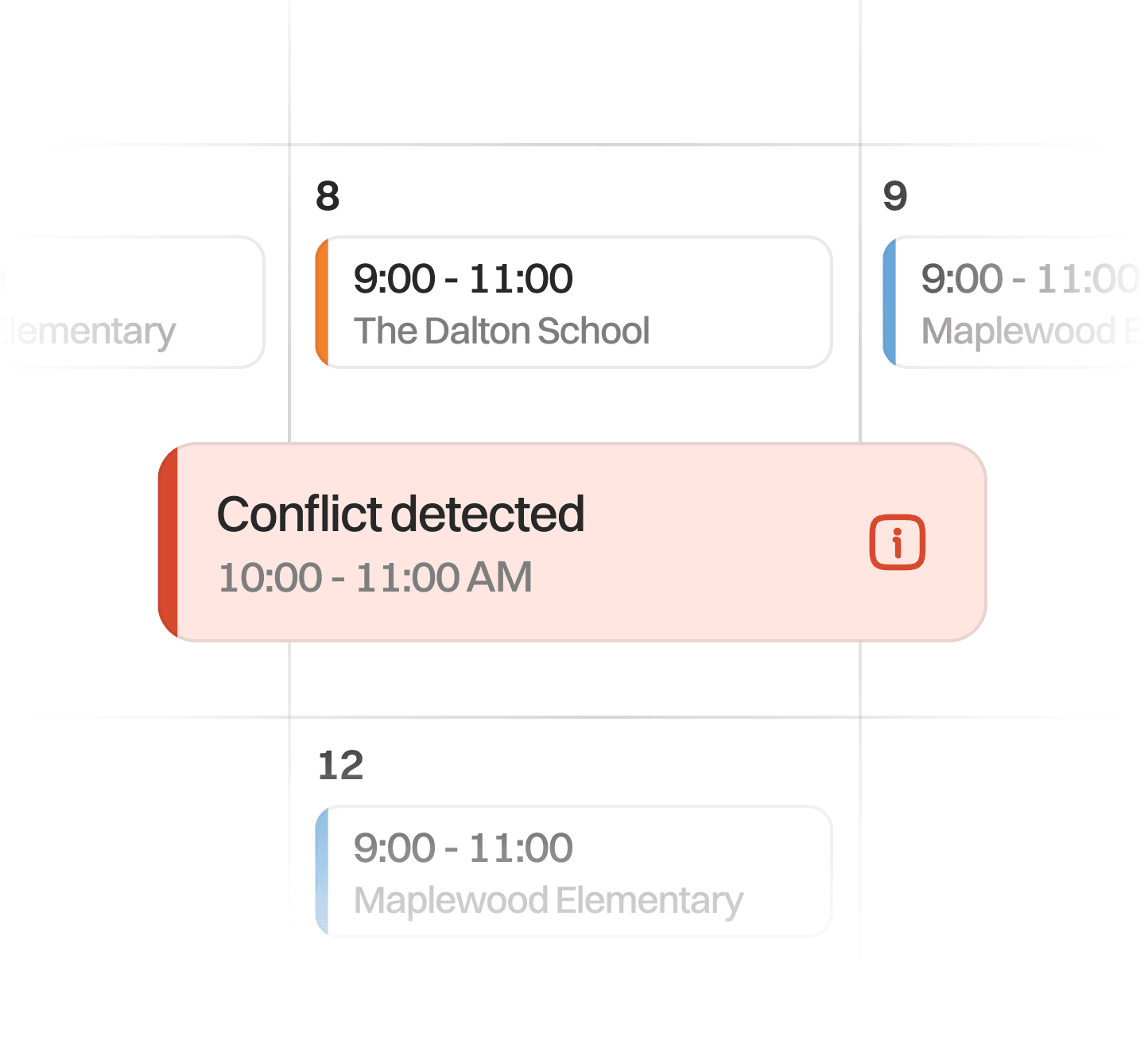
Stop double-bookings

Conflict checks, internal holds, and buffers keep slots clean while parents decide.

SpedSync meeting booking calendar interface

Conflict detected

/01

Reclaim your inbox

Smart availability checks every team member's work hours, calendars, recurring blocks, and buffers automatically. No more polling.

SpedSync team availability setup interface

/02

Let parents book themselves

A simple self-service link means no phone tag. Parents pick, confirm, reschedule, and cancel on their own.

SpedSync parent booking link interface

12:00 PM

1:00 PM

2:00 PM

3:00 PM

4:00 PM

/03

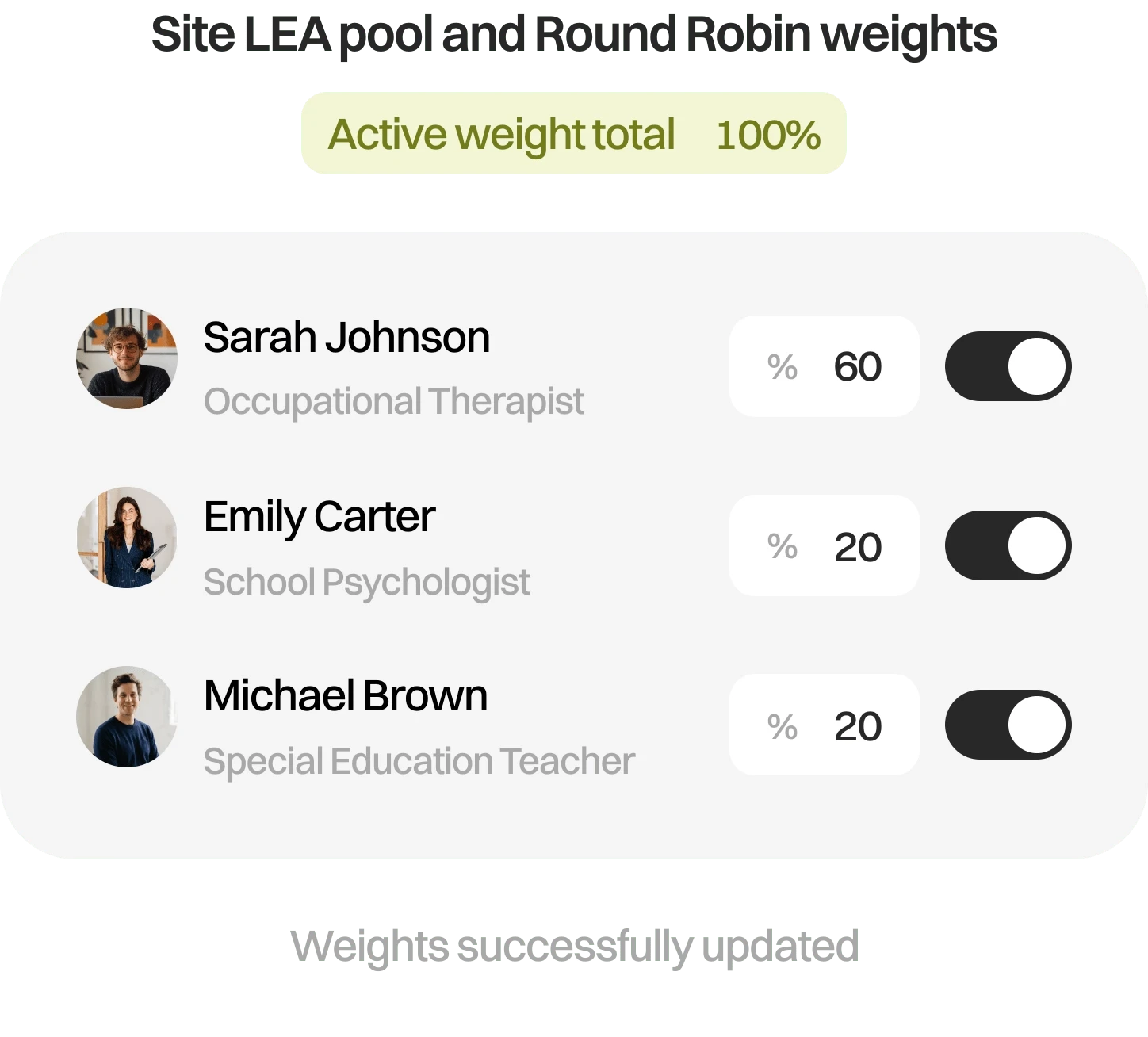
Balance the workload

Set weights across your team so meetings are distributed fairly and automatically.

Site LEA pool and Round Robin weights

Active weight total

80%

Sarah Johnson

Occupational Therapist

%

60

Emily Carter

School Psychologist

%

0

Michael Brown

Special Education Teacher

%

20

You have unsaved changes

/04

Never rebuild a team

Saved teams remember your common attendee groups, so the next meeting starts in one click.

Saved teams

IEP Core team

6 members

YS

EB

+3

Behavior Support

3 members

TP

Transition planning

2 members

504 Review team

4 members

IM

New team

/05

Stop double-bookings

Conflict checks, internal holds, and buffers keep slots clean while parents decide.

SpedSync meeting booking calendar interface

Conflict detected

/04

Never rebuild a team

Saved teams remember your common attendee groups, so the next meeting starts in one click.

Saved teams

IEP Core team

6 members

YS

EB

+3

Behavior Support

3 members

TP

Transition planning

2 members

504 Review team

4 members

IM

New team

/05

Stop double-bookings

Conflict checks, internal holds, and buffers keep slots clean while parents decide.

SpedSync meeting booking calendar interface

Conflict detected

/01

Reclaim your inbox

Smart availability checks every team member's work hours, calendars, recurring blocks, and buffers automatically. No more polling.

SpedSync team availability setup interface

/02

Let parents book themselves

A simple self-service link means no phone tag. Parents pick, confirm, reschedule, and cancel on their own.

SpedSync parent booking link interface

12:00 PM

1:00 PM

2:00 PM

3:00 PM

4:00 PM

/03

Balance the workload

Set weights across your team so meetings are distributed fairly and automatically.

Site LEA pool and Round Robin weights

Active weight total

80%

Sarah Johnson

Occupational Therapist

%

60

Emily Carter

School Psychologist

%

0

Michael Brown

Special Education Teacher

%

20

You have unsaved changes

/04

Never rebuild a team

Saved teams remember your common attendee groups, so the next meeting starts in one click.

Saved teams

IEP Core team

6 members

YS

EB

+3

Behavior Support

3 members

TP

Transition planning

2 members

504 Review team

4 members

IM

New team

/05

Stop double-bookings

Conflict checks, internal holds, and buffers keep slots clean while parents decide.

SpedSync meeting booking calendar interface

Conflict detected

/04

Never rebuild a team

Saved teams remember your common attendee groups, so the next meeting starts in one click.

SpedSync saved meeting team illustration

/05

Stop double-bookings

Conflict checks, internal holds, and buffers keep slots clean while parents decide.

SpedSync scheduling conflict prevention illustration

/01

Reclaim your inbox

Smart availability checks every team member's work hours, calendars, recurring blocks, and buffers automatically. No more polling.

SpedSync illustration for reclaiming time from scheduling email

/02

Let parents book themselves

A simple self-service link means no phone tag. Parents pick, confirm, reschedule, and cancel on their own.

SpedSync parent self-service booking illustration

/03

Balance the workload

Set weights across your team so meetings are distributed fairly and automatically.

SpedSync team workload balancing illustration

/04

Never rebuild a team

Saved teams remember your common attendee groups, so the next meeting starts in one click.

SpedSync saved meeting team illustration

/05

Stop double-bookings

Conflict checks, internal holds, and buffers keep slots clean while parents decide.

SpedSync scheduling conflict prevention illustration

/04

Never rebuild a team

Saved teams remember your common attendee groups, so the next meeting starts in one click.

SpedSync saved meeting team illustration

/05

Stop double-bookings

Conflict checks, internal holds, and buffers keep slots clean while parents decide.

SpedSync scheduling conflict prevention illustration

/01

Reclaim your inbox

Smart availability checks every team member's work hours, calendars, recurring blocks, and buffers automatically. No more polling.

SpedSync illustration for reclaiming time from scheduling email

/02

Let parents book themselves

A simple self-service link means no phone tag. Parents pick, confirm, reschedule, and cancel on their own.

SpedSync parent self-service booking illustration

/03

Balance the workload

Set weights across your team so meetings are distributed fairly and automatically.

SpedSync team workload balancing illustration

/04

Never rebuild a team

Saved teams remember your common attendee groups, so the next meeting starts in one click.

SpedSync saved meeting team illustration

/05

Stop double-bookings

Conflict checks, internal holds, and buffers keep slots clean while parents decide.

SpedSync scheduling conflict prevention illustration

Deadlines ahead, a paper trail behind

Help your team keep track without the extra legwork, with deadline tracking and scheduling records that support IEP compliance.

Sara Lopez

Adams High

Initial

Awaiting parent

In 3 days

Sent

Sent

Emma Johnson

Adams High

Annual

May 5, 3:00 PM

Today

Completed

Completed

Ethan Wong

Adams High

Initial

Awaiting parent

Overdue

Viewed

Viewed

Calendar integrations available in SpedSync

Always in sync

Works with your existing calendars, automatically checking conflicts and adding meetings exactly where you want them.

Google Calendar
Microsoft Outlook
Zoom
Google Meet
Microsoft Teams
Google Calendar
Microsoft Outlook
Zoom
Google Meet
Microsoft Teams
Calendar integrations available in SpedSync

Always in sync

Works with your existing calendars, automatically checking conflicts and adding meetings exactly where you want them.

Google Calendar
Microsoft Outlook
Zoom
Google Meet
Microsoft Teams
Google Calendar
Microsoft Outlook
Zoom
Google Meet
Microsoft Teams
Calendar integrations available in SpedSync

Always in sync

Works with your existing calendars, automatically checking conflicts and adding meetings exactly where you want them.

Google Calendar
Microsoft Outlook
Zoom
Google Meet
Microsoft Teams
Google Calendar
Microsoft Outlook
Zoom
Google Meet
Microsoft Teams

Scheduling you can trust across every school

From a single school to a whole district, SpedSync keeps IEP scheduling simple, organized, and reliable.

I used to spend the first two weeks of the year just scheduling. Now it's an afternoon.

Portrait of Sam P., elementary case manager

Sam P.

Case Manager, Elementary

I used to spend the first two weeks of the year just scheduling. Now it's an afternoon.

Portrait of Sam P., elementary case manager

Sam P.

Case Manager, Elementary

Fast, and safe with student data.

FERPA compliant

FERPA

aligned

SOC 2 compliant

SOC 2

practices

District single sign-on supported

District

SSO

Imagine ending the week with your inbox empty.

Imagine ending the week with your inbox empty.

See how much time SpedSync gives back to your team. We’ll walk you through it on your own caseload.

FAQs

Frequently
asked questions.

How is SpedSync different from traditional scheduling tools?

Unlike traditional scheduling tools, SpedSync is built specifically for special education, managing everything from IEP meeting scheduling and deadlines to parent communication and documentation — all in one place.

Can I use my existing Google or Outlook calendar?

Absolutely! SpedSync integrates with Google Calendar and Microsoft Outlook, allowing you to connect multiple calendars and customize which ones are used to determine your availability.

How long does setup take?

Just a few minutes! Staff members connect their calendars, set their availability, and complete their profiles, while case managers can quickly import their existing caseloads.

Does SpedSync track and document meeting communications?

Yes! SpedSync automatically maintains a timestamped history of meeting activity, parent communication, scheduling changes, and confirmations — all accessible in one place.

Do parents need to create an account?

Not at all! Parents can schedule, manage, and reschedule meetings directly through a secure link without creating an account.

Does SpedSync support text messaging and automated reminders?

Yes! SpedSync supports email and SMS notifications, including automated meeting reminders and parent follow-ups.

Will SpedSync replace our current scheduling workflow?

SpedSync brings scheduling, parent communication, deadline tracking, and documentation into one centralized platform, reducing the need for spreadsheets, scheduling polls, and endless email chains.

Do you offer individual subscriptions?

SpedSync is currently designed for schools and school districts, with plans tailored to organizational needs. Contact us to learn more about pricing and available options.

Is SpedSync available as a mobile app?

SpedSync is currently a web-based platform accessible through a browser. A dedicated mobile app is not currently available.